Could Microsoft’s Next Windows Update Break Your Printing?
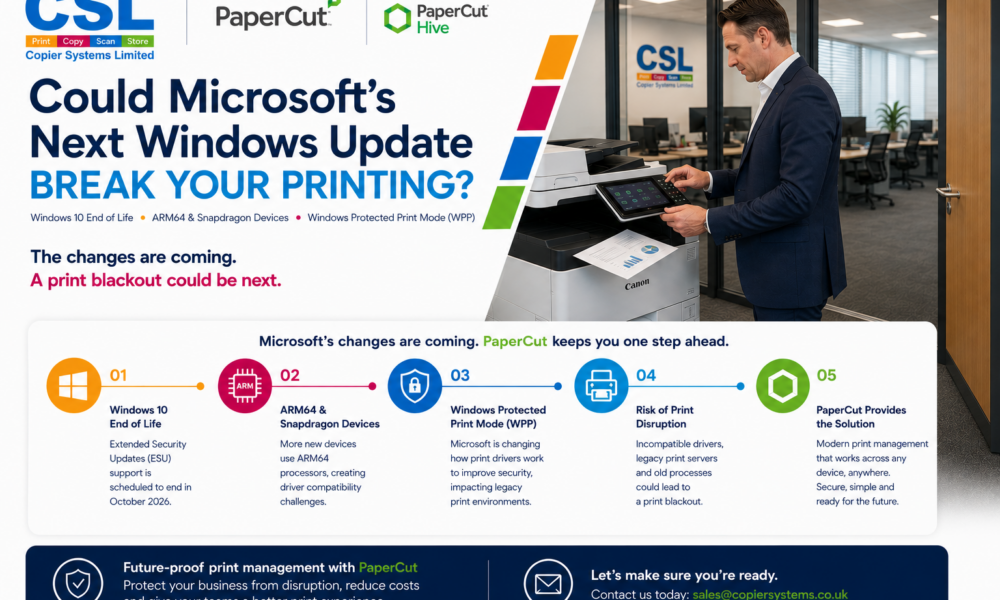
Could Microsoft’s Next Windows Update Break Your Printing?
Windows 10 End of Life, ARM64 Devices and Windows Protected Print Mode Explained
Microsoft is making significant changes to the way printing works within Windows, and many organisations may be unaware of the potential impact these changes could have on their print environment.
With Windows 10 reaching end of life, the increasing adoption of ARM64 and Snapdragon-powered devices, and Microsoft’s introduction of Windows Protected Print Mode (WPP), businesses are facing one of the biggest shifts in print infrastructure for many years.
For organisations that rely on printing every day, now is the time to understand what these changes mean and how to avoid unexpected disruption.
What Changes Are Microsoft Making?
Windows 10 End of Life
Microsoft’s Extended Security Updates (ESU) programme for Windows 10 is scheduled to end in October 2026.
As organisations transition to Windows 11, many will also be refreshing desktops, laptops and other workplace technology. While much of the focus is often placed on the PC estate itself, printing infrastructure is frequently overlooked until problems begin to arise.
ARM64 and Snapdragon Devices
Many of the latest laptops entering the market now use ARM64 processors, including devices powered by Qualcomm Snapdragon technology.
These devices offer excellent battery life and performance benefits, but they also introduce new compatibility considerations. Not all printer manufacturers have developed fully supported ARM64 print drivers, which can create deployment challenges for IT teams and affect user printing experiences.
Windows Protected Print Mode (WPP)
Windows Protected Print Mode (WPP) forms part of Microsoft’s broader strategy to reduce reliance on third-party print drivers and traditional deployment methods, encouraging organisations to adopt more modern and secure approaches to print management.
The End of Traditional Printer Deployment?
For many years, IT teams have relied on Active Directory, Print Servers and Group Policies (GPOs) to deploy printers across their organisation.
A typical process involved creating print queues on a server, installing manufacturer-specific drivers and using Group Policy to automatically map printers to users or departments.
As Microsoft continues moving towards cloud-first management through platforms such as Microsoft Intune, alongside Windows Protected Print Mode (WPP), organisations are increasingly moving away from traditional on-premise print deployment methods.
For IT teams, this presents a challenge. Existing printer deployment processes may become more complex to maintain, particularly when supporting hybrid workers, ARM64 devices and multiple office locations.
Without a modern deployment strategy, printer installations can quickly become a manual, time-consuming process that increases support tickets and administrative overhead.
How PaperCut Simplifies Printer Deployment
One of the biggest advantages of PaperCut is its ability to simplify printer deployment and reduce reliance on traditional print servers and Group Policy deployment methods.
PaperCut’s universal print deployment technology allows users to automatically receive the correct printers and queues based on their location, role or device, without the complexity often associated with traditional print driver installations.
This becomes particularly valuable as organisations adopt Windows 11, ARM64 devices and cloud-managed environments where traditional deployment methods may no longer be practical.
Instead of manually configuring printers, managing numerous print drivers or troubleshooting compatibility issues, PaperCut provides a consistent and simplified deployment experience for both users and IT teams.
PaperCut MF: Automated Print Queue Deployment
For organisations using on-premise environments, PaperCut MF includes Print Deploy, a powerful tool that automatically deploys print queues and printers to users.
Print Deploy enables organisations to:
- Automatically install printers based on location
- Reduce reliance on Group Policy printer deployment
- Simplify printer onboarding for new users
- Support roaming users across multiple sites
- Reduce IT administration time
- Improve consistency across the print estate
For businesses managing multiple offices, departments or printer fleets, Print Deploy can significantly reduce the workload associated with printer management.
PaperCut Hive: Built for Cloud-First Organisations
For organisations embracing cloud-first strategies or hybrid print environments, PaperCut Hive takes print deployment even further.
Hive’s Print Queue Deployment technology allows users to quickly discover and connect to printers without requiring traditional print servers, complex driver management or extensive IT intervention.
This provides several key advantages:
- Faster printer deployment
- Simplified onboarding for remote and hybrid workers
- Reduced dependency on print servers
- Greater compatibility with modern Windows environments
- Easier support for ARM64 and future device platforms
As Microsoft continues evolving Windows printing, cloud-managed print environments such as PaperCut Hive help organisations stay ahead of change whilst reducing complexity for both users and IT teams.
Why Legacy Print Environments Are at Risk
Many organisations still operate print environments that were designed years ago around traditional Windows devices, print servers and manufacturer-specific drivers.
As Microsoft’s print ecosystem evolves, these legacy environments can quickly become a weak point.
Older multifunction devices may not fully support modern print deployment methods. Legacy print servers can introduce additional complexity. Traditional driver-based deployments may require significant changes to remain compatible with newer Windows technologies.
Without planning ahead, organisations could face:
- Printer compatibility issues
- Increased support tickets
- More time spent managing print drivers
- Security concerns around legacy infrastructure
- User frustration and lost productivity
- Potential print blackouts following device upgrades or Windows updates
If printing is business-critical within your organisation, these risks should not be ignored.
What Is a Print Blackout?
A print blackout occurs when users are suddenly unable to print due to driver incompatibilities, operating system changes or unsupported hardware.
As organisations deploy Windows 11, introduce ARM64 devices and adapt to Windows Protected Print Mode, the risk of printing disruption increases if existing print infrastructure has not been reviewed.
For businesses that rely on printing invoices, delivery notes, customer documentation, contracts, healthcare records or educational materials, even a short period of downtime can have a significant operational impact.
How PaperCut Helps Future-Proof Printing
PaperCut provides a modern print management platform designed to support today’s office, hybrid and cloud-first workplaces.
Rather than relying heavily on traditional print servers and complex driver deployments, PaperCut simplifies print management while providing greater security, visibility and control.
Benefits include:
- Reduced Print Costs – Many organisations achieve print cost reductions of up to 30% through intelligent print policies, user accountability and automated print controls.
- Improved Security – Secure print release, user authentication and comprehensive audit trails help protect sensitive information and support compliance requirements.
- Simpler Print Deployment- PaperCut helps reduce the complexity associated with traditional printer deployment methods, making it easier to support modern Windows environments and hybrid workforces.
- Greater Visibility – Detailed reporting allows organisations to understand print behaviour, allocate costs and identify opportunities for improvement.
- Less Burden on IT Teams – By simplifying print management and reducing dependency on legacy deployment methods, IT teams can spend less time troubleshooting printers and more time focusing on strategic projects.
Is It Time to Upgrade Your Print Infrastructure?
For some organisations, PaperCut alone may provide the solution needed to modernise print management and reduce risk.
For others, particularly those operating older multifunction devices or legacy print infrastructure, it may also be worth considering a hardware refresh to ensure long-term compatibility, security and reliability.
Every environment is different, which is why reviewing your print infrastructure before these Microsoft changes take full effect is so important.
Don’t Wait for a Print Blackout
Microsoft’s changes are coming, and while they bring welcome improvements to security and modern workplace technology, they also present challenges for organisations relying on older print environments.
If printing is critical to your business operations, now is the ideal time to review your current setup.
Whether you’re looking to implement PaperCut, assess the impact of Windows Protected Print Mode, support new ARM64 devices or explore upgrading legacy print equipment, our team can help.
Let’s Future-Proof Your Print Environment
Contact CSL today to discuss how we can help you avoid print disruption, improve security and reduce print costs.