Printer Lease and Managed Print: What Is a Printer Lease & How Managed Print Benefits Businesses
Printer Lease and Managed Print: What is a Printer Lease & How Managed Print Benefits Businesses
Table of Contents
- What Is a Printer Lease?
- The Benefits of Leasing a Printer or Photocopier
- Why More Businesses Are Choosing Managed Print
- Printer Lease vs Buying Outright
- Choosing the Right Office Printer or Photocopier
- Why Choose an Independent Managed Print Provider Like CSL?
- What Should You Look for in a Managed Print Contract?
- Is a Printer Lease Right for Your Business?
- Speak to CSL About Arranging A FREE Audit Of Your Current Print Setup
What Is a Printer Lease?
A printer lease allows your business to use an office printer or photocopier through an agreed finance arrangement, rather than paying the full equipment cost upfront.
Businesses can spread the cost of their printing equipment over an agreed period. This can make it easier to budget for essential office technology without a significant initial outlay.
A photocopier lease works in much the same way. It allows organisations to access professional A3 or A4 multifunction printers that print, scan and copy documents.
However, leasing the equipment is only part of the picture.
Many businesses now combine a printer lease with a managed print service. This brings the equipment, maintenance, toner and ongoing support together into a more straightforward arrangement.
Instead of managing printers independently, businesses can work with one provider to oversee their printing requirements.
At CSL (Copier Systems Limited), we help businesses find printing solutions that suit their workplace, budget and operational needs. As an independent provider, we can recommend equipment from different manufacturers rather than restricting customers to one brand.
Whether you need a single office printer, several departmental photocopiers or a complete managed print solution, the right arrangement can help your business work more efficiently.
The Benefits of Leasing a Printer or Photocopier
Choosing a printer lease offers several potential advantages for businesses of different sizes. From managing cash flow to reducing the burden of equipment maintenance, leasing can provide a more practical approach to office printing.
1.Spread the Cost of Your Printing Equipment
Purchasing a professional office printer or photocopier outright can require a considerable upfront investment, particularly when multiple devices are needed.
Leasing allows businesses to spread the equipment cost over an agreed term. This can help preserve working capital for other priorities, such as recruitment, IT infrastructure, cybersecurity or business development.
Predictable rental payments can also make financial planning easier.
For growing businesses, this approach may provide access to better-suited equipment without committing a large amount of capital at the outset.
The most suitable arrangement will depend on your budget, usage and finance terms. It’s worth comparing the total cost of leasing against purchasing outright before making a decision.
2. Make Business Printing Costs Easier to Manage
Printing costs can quickly become difficult to track when equipment, toner, repairs and replacement parts are purchased separately.
A printer lease combined with managed print can bring more of these costs under one arrangement.
Depending on the agreement, your service may include equipment, maintenance, toner, replacement parts and engineer call-outs.
This makes it easier to understand what you’re paying for and reduces the need to manage multiple suppliers.
It’s important to check exactly what’s included in any proposal. Equipment rental and service charges can be separate, and print usage charges may also apply.
At CSL, we work with businesses to understand their current printing arrangements and identify opportunities to improve value.
3. Reduce Unexpected Repair and Maintenance Costs
When an office printer breaks down, the impact can extend beyond the cost of a repair.
Staff may struggle to print important documents, process paperwork or complete customer orders. In some workplaces, a faulty photocopier can disrupt several departments at once.
With a suitable managed print agreement, routine servicing and repairs can be covered by the service contract.
Access to technical support can also help businesses resolve problems more quickly.
CSL provides managed print support with a focus on reliable service. Our service offering includes a 98% first-time fix rate and a four-hour response time.
The exact terms and service commitments should always be confirmed for your proposed agreement.
4. Access Modern Printing Technology
Office printing technology continues to develop, with improvements in security, scanning, connectivity and energy efficiency.
Leasing can provide a structured way to access newer equipment without paying the entire purchase price upfront.
This is particularly useful for businesses whose printing requirements change over time.
For example, a company expanding its workforce may need a faster multifunction printer. A business handling confidential paperwork may require secure printing features. Another organisation may prioritise high-volume scanning and digital document workflows.
A well-planned lease can help you select equipment that supports your current needs while allowing you to review your requirements when the agreement approaches its end.
5. Free Up Time for Your Team
Managing printers internally can involve more work than many businesses realise.
Someone needs to order toner, arrange repairs, investigate recurring faults and keep track of different devices. These responsibilities can create unnecessary administration for IT teams, office managers and finance departments.
A managed print provider can take responsibility for many of these tasks.
That means your team can spend less time dealing with printer problems and more time focusing on its core responsibilities.
For businesses without a dedicated IT department, having one point of contact for printing support can be particularly valuable.
Why More Businesses Are Choosing Managed Print
Leasing equipment can help spread costs, but managed print takes the approach further.
Managed print services (MPS) involve outsourcing some or all of the management, maintenance and ongoing support of an organisation’s printing environment.
Rather than simply supplying an office printer, a managed print provider helps businesses manage how they print, what they spend and how their devices are maintained.
What Does a Managed Print Service Include?
The exact package will vary between providers, but a managed print service can include:
- Printing equipment: Access to suitable office printers and photocopiers through an agreed arrangement.
- Toner and consumables: Delivery of the supplies required to keep compatible devices running.
- Maintenance and repairs: Technical support, replacement parts and engineer call-outs, according to the contract.
- Usage monitoring: Better visibility of printing volumes and device performance.
- Cost management: Support with understanding print expenditure and identifying potential savings.
- Print management software: Tools to control access, allocate costs and manage printing rules.
- Security features: Options such as secure print release, user authentication and controls over sensitive documents.
Not every agreement includes all these features, so it’s worth reviewing the proposed service carefully.
Improve Visibility of Printing Costs
Many organisations don’t have a clear picture of their total printing costs.
They may know how much they pay for a printer or photocopier
but overlook the cost of cartridges, individual printer repairs, wasted paper and time spent managing equipment.
A managed print review can help bring these costs together.
It can also identify devices that are underused, printers that are expensive to operate and opportunities to consolidate equipment.
For example, replacing several inefficient desktop printers with a shared multifunction device may reduce duplication and simplify maintenance. However, the right solution depends on how staff work and where equipment is needed.
The objective isn’t simply to reduce the number of printers. It’s to build a printing setup that makes financial and operational sense.
Improve Print Security and Control
Printers and photocopiers are connected devices, and they should form part of your wider IT security considerations.
Depending on the equipment and configuration, businesses may need to consider access controls, firmware updates, encryption, secure network protocols and the handling of confidential documents.
Print management software can add further controls.
For example, secure print release can require users to authenticate themselves at a device before their documents are printed. This can help reduce unattended paperwork and improve accountability.
Solutions such as PaperCut can also help organisations apply printing rules, monitor usage and manage who can print in colour or use particular devices.
For businesses with compliance requirements or established IT security policies, these capabilities can be an important part of the wider managed print strategy.
Support More Efficient Ways of Working
A modern office printer does much more than print pages.
Multifunction devices can scan documents, send files to approved destinations and support digital document workflows. These capabilities can reduce manual administration and make information easier to process.
The right equipment and software can help businesses move away from unnecessary paper-based processes while maintaining printing where it’s still needed.
For organisations looking to improve productivity, managed print provides an opportunity to review both the devices themselves and the way people use them.
Printer Lease vs Buying Outright
Should your business lease a printer or photocopier, or buy one outright?
There isn’t a universal answer. The best option depends on your available capital, expected usage, service requirements and long-term plans.
| Consideration | Leasing | Buying outright |
|---|---|---|
| Initial cost | Usually lower upfront equipment expenditure | Higher upfront equipment expenditure |
| Budgeting | Regular rental payments over an agreed term | Larger initial payment, with ongoing costs |
| Maintenance | Can be included through a separate or combined service agreement | Usually arranged and paid for separately |
| Equipment changes | Can provide a structured opportunity to review equipment at the end of a term | You decide when to replace the equipment |
| Ownership | Depends on the finance agreement | You generally own the equipment |
| Long-term cost | Depends on rental, service and usage charges | Depends on purchase price, maintenance and running costs |
One important point: leasing equipment doesn’t automatically mean you have a managed print service.
A lease is a finance arrangement for the equipment. Managed print is the service that can cover ongoing support, consumables, monitoring and print management.
Businesses should compare like-for-like proposals and check the full contract terms, including the lease length, service inclusions, usage charges and end-of-contract options.
If you’re unsure which approach makes sense, an independent review of your current printing costs can help you make a more informed decision.
Choosing the Right Office Printer or Photocopier
The cheapest printer isn’t necessarily the most cost-effective option.
A device needs to suit the volume of printing, the type of documents produced and the way your team works. Choosing equipment based on the purchase price alone can lead to higher running costs or unnecessary limitations.
Before committing to a printer lease, consider the following.
How Much Do You Print?
Start by understanding your monthly print volumes.
A small office producing a few hundred pages each month will have different requirements from a busy department producing thousands of documents.
Look at both mono and colour volumes, as well as whether you need A4 printing, A3 printing or specialist paper handling.
This information helps identify the right device and avoid paying for capacity you don’t need.
Do You Need an A3 or A4 Office Printer?
An A4 office printer may be suitable for everyday correspondence, invoices and standard office documents.
An A3 photocopier can provide additional flexibility for larger documents, presentations, plans and certain marketing materials.
Multifunction equipment can also combine printing, copying and scanning in one device.
Think about how your staff use their printers today and whether their needs are likely to change during the agreement.
What Are the Running Costs?
The cost of a printer goes beyond its rental payment or purchase price.
You should also consider the cost per page, consumables, energy use, maintenance and any service charges.
A device with a lower rental payment may not deliver the best overall value if it has higher running costs or doesn’t suit your printing volumes.
A good managed print proposal should explain the expected costs clearly and identify any assumptions used in the calculation.
Do You Need Print Management Software?
If your business has multiple printers, departments or users, software can help improve control.
Features such as secure release, colour-printing restrictions, user reporting and departmental cost allocation may be useful.
The right software depends on your IT environment, security policies and the level of control you need.
Discuss these requirements before choosing your equipment, rather than treating print management as an afterthought.
Why Choose an Independent Managed Print Provider Like CSL?
One of the biggest advantages of working with CSL is our independence.
Some print providers focus on a limited range of equipment. As an independent managed print provider, CSL can assess different manufacturers and recommend a solution based on what your business actually needs.
That means we’re not restricted to a single brand when considering performance, running costs, functionality and suitability.
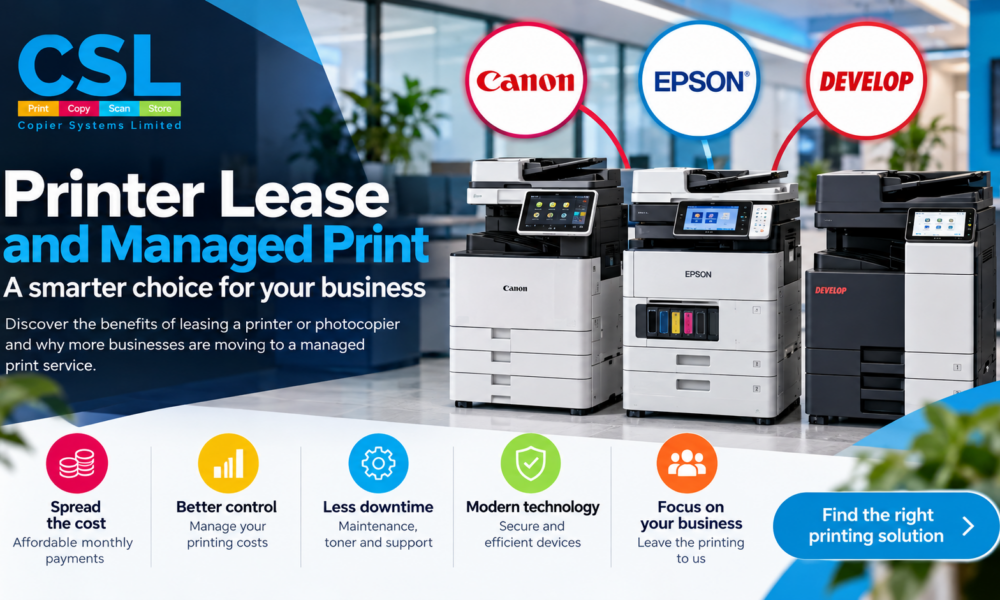
We supply equipment from Canon, Epson and Develop, giving businesses access to different approaches to office printing.
Canon Office Printers and Photocopiers
Canon offers a range of office printing equipment, including multifunction devices designed for business environments.
Depending on the model, features can include professional-quality printing, scanning capabilities, productivity tools and security options.
If your business needs reliable everyday printing or a multifunction device for a busy office, explore our range of Canon office printers and photocopiers.
Epson Business Printing Solutions
Epson provides business printing solutions that include its WorkForce range and Heat-Free inkjet technology.
Depending on the model and application, Epson devices can offer an alternative to traditional laser printing, with considerations such as energy consumption, print volumes and ongoing running costs.
For businesses looking to review their printing technology, our Epson business printers are worth exploring.
Develop Office Printers and Photocopiers
Develop offers multifunction office printing equipment designed to support everyday business document requirements.
Depending on the model, devices can provide A3 and A4 printing, copying, scanning and features to support office productivity and document handling.
If you’re considering a new photocopier lease or replacing existing equipment, take a look at our Develop office printers and photocopiers.
A Solution Built Around Your Business
Choosing a manufacturer is only one part of the process.
We also consider your print volumes, current costs, workplace layout, IT requirements and the level of support you need.
For one business, the priority might be reducing colour-printing costs. For another, it could be improving document security or replacing several unreliable devices.
By looking at the wider picture, CSL can recommend equipment and managed print services that reflect your actual requirements.
Our approach is straightforward: the right advice, the right solution and the right support for your business.
What Should You Look for in a Managed Print Contract?
Before agreeing to a printer lease or managed print service, make sure you understand the terms.
Comparing proposals properly can help you avoid unexpected charges and ensure the service meets your needs.
Here are some important questions to ask.
What’s Included in the Monthly Cost?
Check whether the proposal separates equipment rental from service charges. It is also worth checking the service charges are labelled as per print or per copy as many providers nowadays are applying hidden charges which results in a print cost being multiplied under tiered billing, the cost per print is also the same charge for scans, with CSL scans are free
Confirm whether toner, parts, labour, maintenance and call-outs are included. Ask about exclusions, minimum charges, print allowances and additional page costs.
You should be able to understand what you’ll pay under normal operating conditions and what might create additional charges.
How Long Is the Agreement?
Check the length of the finance agreement and service contract.
Consider what happens if your requirements change, your business relocates or your printing volumes increase.
Also establish the process for reviewing equipment when the agreement approaches its end.
Finance agreements can have important legal and financial obligations, so make sure you understand the terms before signing.
What Support Can You Expect?
Ask about response times, fault reporting, engineer availability and the process for resolving recurring problems.
A low monthly cost may be less attractive if support is difficult to access when a device fails.
Look for a provider that explains its service commitments clearly and can demonstrate how it supports customers.
Can the Solution Grow With Your Business?
Your printing requirements may change as your workforce grows or your processes evolve.
Discuss whether the proposed equipment has enough capacity and whether the provider can help review your setup in the future.
The goal is to choose a solution that works for your business today without overlooking what you may need tomorrow.
Is a Printer Lease Right for Your Business?
A printer lease combined with managed print can be worth considering if your organisation wants to spread equipment costs, simplify maintenance and improve visibility of its printing expenditure.
It can be particularly useful for businesses that:
- Want to avoid a large upfront equipment investment.
- Need reliable office printers or photocopiers with ongoing support.
- Want to bring toner, servicing and maintenance under a clearer arrangement.
- Need better visibility of print volumes and running costs.
- Want to improve printing security and control.
- Want to remove the need to search for the best cartridge prices online and have a managed service that automatically dispatches replacement consumables
- Are reviewing older devices or preparing for a contract renewal.
However, leasing isn’t automatically the best choice for every organisation. Businesses with sufficient capital, low usage or different equipment requirements may prefer to buy outright.
The important thing is to compare the total costs, understand the contract and select equipment that suits your working environment.
If you’re approaching the end of an existing agreement, it’s worth reviewing your options before renewal. This gives you time to assess your current devices, compare costs and consider whether your existing setup still meets your needs.
CSL can help you understand your options and identify areas where a different approach to managed print could deliver better value.
Speak to CSL About Your Printer Lease
Finding the right printer lease isn’t just about choosing a machine and agreeing a monthly payment. It’s about making sure your equipment, running costs and support arrangements work for your business.
At CSL, we combine independent equipment recommendations with managed print expertise to help businesses make informed decisions.
Whether you’re looking for a new office printer, replacing an ageing photocopier or reviewing an existing managed print contract, we’re happy to discuss your requirements.
Want to find out whether your business could benefit from a better printing solution?
Contact CSL to arrange your Free Print audit and discuss your print requirements
Let us help you find the right solution for your business printer requirements